Array Flatten in JavaScript: Unboxing the Boxes
Wait, What Even Is a Nested Array?
When I first started learning JavaScript, arrays felt simple enough. A list of things:
const fruits = ['apple', 'banana', 'mango'];
Clean. Straightforward. Then I ran into this:
const weirdArray = [1, [2, 3], [4, [5, 6]], [[[7]]]];
My first reaction was — why would anyone do this? Turns out, it happens more often than you'd think. When you're working with real data from APIs, file systems, or grouped UI elements, arrays end up nested inside other arrays. That's just the shape the data comes in.
These are called nested arrays — arrays that contain other arrays as their elements.
Let Me Show You What "Nested" Really Looks Like
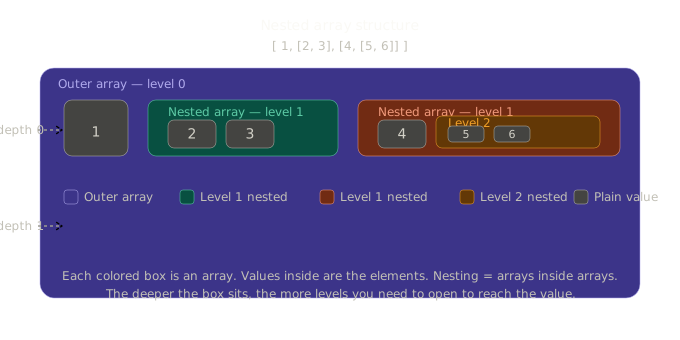
Think of it like boxes inside boxes.
Imagine you ordered some items online and they arrived like this — a big box, with smaller boxes inside, some of which have even tinier boxes inside them. Each box holds a value, but to get to it, you have to open every layer.
Here's what that looks like in code:
// Level 1 — flat, no nesting
[1, 2, 3, 4]

// Level 2 — one layer of nesting
[1, [2, 3], [4, 5]]

// Level 3 — two layers of nesting
[1, [2, [3, 4]], [5, [6]]]

// Deeply nested — multiple layers
[[[1]], [[2, 3]], [[[4]]]]
And here's the thing — if you try to loop over a deeply nested array expecting just numbers, you're going to hit arrays instead. You can't use the values directly until you flatten the structure.
So What Does "Flattening" Mean?
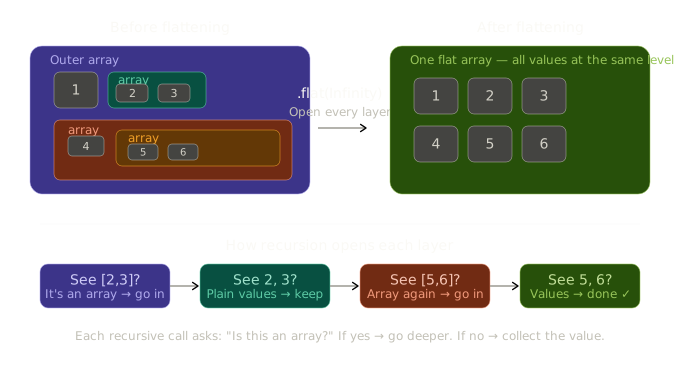
Flattening means taking a nested array — no matter how many layers deep — and turning it into a single, flat array where every element is a plain value, not another array.
Visually, the transformation looks like this:
Before flattening:
[1, [2, 3], [4, [5, 6]]]
After flattening:
[1, 2, 3, 4, 5, 6]
All the boxes got opened. All the values are now sitting together at the same level. That's it. That's flattening.
Let me show you a diagram to make this even clearer 👇
The Visual: Nested → Flat
Why Would You Even Need to Flatten?
Great question — I asked the same thing. Here are some real situations where this comes up:
1. API responses with grouped data An API might return data grouped by category:
const categoryItems = [
  ['shirt', 'pants', 'jacket'],
  ['shoes', 'sandals'],
  ['hat', 'cap']
];
// You want one single list of all items, not groups
2. Merging results from multiple sources
const searchResults = [
  ['result1', 'result2'],
  ['result3'],
  ['result4', 'result5', 'result6']
];
// You want to display all results in one list
3. Interview problems — This is one of the most commonly asked JavaScript questions in technical interviews. Understanding it deeply will serve you well.
Approach 1: The Modern Way — Array.flat()
JavaScript added a built-in method called .flat() in ES2019. This is the easiest and most readable approach.
const nested = [1, [2, 3], [4, [5, 6]]];

// Flatten one level deep (default)
nested.flat();
// → [1, 2, 3, 4, [5, 6]]

// Flatten two levels deep
nested.flat(2);
// → [1, 2, 3, 4, 5, 6]

// Flatten ALL levels, no matter how deep
nested.flat(Infinity);
// → [1, 2, 3, 4, 5, 6]
Notice what happened with flat() (no argument) — it only opened one layer. The inner [5, 6] stayed nested because it was two levels deep. You have to tell it how many levels to go, or use Infinity to flatten everything.
When to use this: When you're working in a modern environment and just need something clean and readable. This is your go-to.
Approach 2: Using reduce() + concat()
This is the approach you'll see in most interviews and older codebases. It manually flattens one level using reduce:
const nested = [1, [2, 3], [4, 5]];

const flat = nested.reduce((accumulator, current) => {
  return accumulator.concat(current);
}, []);

console.log(flat);
// → [1, 2, 3, 4, 5]
Breaking this down step by step:
Start with an empty array
[]as the accumulatorFor each element in the array:
If it's a plain value like
1,concatadds it directlyIf it's an array like
[2, 3],concatspreads it in
By the end, everything is merged into one flat array
This only handles one level of nesting though. For deeper structures, you need recursion (coming up next).
Approach 3: Recursion — For Any Depth
This is the most powerful approach, and the one interviewers love to ask you to write from scratch.
The idea: look at each element. If it's not an array, keep it. If it is an array, flatten it — and repeat that same logic for whatever's inside.
function flattenDeep(arr) {
  let result = [];

  for (let i = 0; i < arr.length; i++) {
    if (Array.isArray(arr[i])) {
      // This element is an array — go deeper
      const innerFlat = flattenDeep(arr[i]);
      result = result.concat(innerFlat);
    } else {
      // This element is a plain value — keep it
      result.push(arr[i]);
    }
  }

  return result;
}

const nested = [1, [2, [3, [4, [5]]]]];
console.log(flattenDeep(nested));
// → [1, 2, 3, 4, 5]
What's happening here:
We loop through every element
We ask: is this element an array?
If yes → call
flattenDeepon it (the function calls itself — that's recursion)If no → it's a value, just push it into our result
By the time every recursive call finishes, all values have been collected
This handles any depth of nesting, automatically.
Approach 4: The One-Liner (Using toString)
This one is a bit of a trick — not production-ready, but interesting to know:
const nested = [1, [2, [3, [4]]]];

const flat = nested.toString().split(',').map(Number);
console.log(flat);
// → [1, 2, 3, 4]
It works by converting the whole array to a string "1,2,3,4", splitting on commas, then converting back to numbers. But it breaks with strings and objects — so only use this to show off at parties, not in real code.
Quick Comparison: All Approaches Side by Side
| Approach | Handles Any Depth | Readable | Works on Old Browsers | Interview Value |
|---|---|---|---|---|
flat(Infinity) |
✔ | ✔ Very | ✖ ES2019+ only | Medium |
reduce + concat |
✖ One level | ✔ Yes | ✔ Yes | High |
| Recursion | ✔ | ● Moderate | ✔ Yes | ★ Very High |
toString trick |
✔ | ✖ Hacky | ✔ Yes | Low |
The Interview Scenario
In interviews, you'll almost never get asked "use .flat()". They want to see you think. The typical question is:
"Write a function to flatten a deeply nested array without using the built-in
.flat()method."
Your answer should be the recursive approach. Here's a clean version you can memorize:
function flatten(arr) {
  return arr.reduce((acc, val) => {
    return Array.isArray(val)
      ? acc.concat(flatten(val))  // go deeper
      : acc.concat(val);          // it's a value, keep it
  }, []);
}

// Test it
console.log(flatten([1, [2, [3, [4, [5]]]]]));
// → [1, 2, 3, 4, 5]
This is the reduce + recursion combo — compact, elegant, and it covers infinite depth. Walk through it out loud in your interview and explain each decision. That's what they're actually evaluating.
The Diagram: Seeing the Transformation
Let me make the nested-to-flat transformation visual before we wrap up: