Array Methods You Must Know

Arrays are great for storing lists of values, but the real power comes from the methods that let us work with those values efficiently. Instead of writing long loops every time we want to modify or process an array, JavaScript provides built-in methods that make the job much easier.
In this article, we’ll look at some commonly used array methods and understand how they work using simple examples.
push() and pop()
These methods are used to add or remove elements from the end of an array.
push()
push() adds a new element to the end of the array.
let fruits = ["Apple", "Banana", "Mango"];

fruits.push("Orange");

console.log(fruits);
Before:
["Apple", "Banana", "Mango"]
After:
["Apple", "Banana", "Mango", "Orange"]
pop()
pop() removes the last element from the array.
let fruits = ["Apple", "Banana", "Mango"];

fruits.pop();

console.log(fruits);
After running the code:
["Apple", "Banana"]
shift() and unshift()
These methods work similarly to push and pop, but they operate at the beginning of the array.
unshift()
Adds an element to the start of the array.
let fruits = ["Banana", "Mango"];

fruits.unshift("Apple");

console.log(fruits);
Output:
["Apple", "Banana", "Mango"]
shift()
Removes the first element of the array.
let fruits = ["Apple", "Banana", "Mango"];

fruits.shift();

console.log(fruits);
Output:
["Banana", "Mango"]
forEach()
forEach() is used to run a function for every element in the array.
Instead of writing a traditional loop, we can simply use this method.
Example using a for loop:
let numbers = [1, 2, 3];

for (let i = 0; i < numbers.length; i++) {
  console.log(numbers[i]);
}
Using forEach():
let numbers = [1, 2, 3];

numbers.forEach(function(num) {
  console.log(num);
});
Both produce the same result, but forEach() is usually cleaner.
map()
The map() method creates a new array by applying a function to each element.
For example, suppose we want to double every number in an array.
let numbers = [1, 2, 3, 4];

let doubled = numbers.map(function(num) {
  return num * 2;
});

console.log(doubled);
Output:
[2, 4, 6, 8]
Notice that the original array remains unchanged.
How map() Works

Each value in the original array goes through a function, and the result is stored in a new array.
filter()
The filter() method is used when we want to select certain elements based on a condition.
Example:
let numbers = [5, 12, 8, 20, 3];

let result = numbers.filter(function(num) {
  return num > 10;
});

console.log(result);
Output:
[12, 20]
Only numbers greater than 10 are kept.
How filter() Works
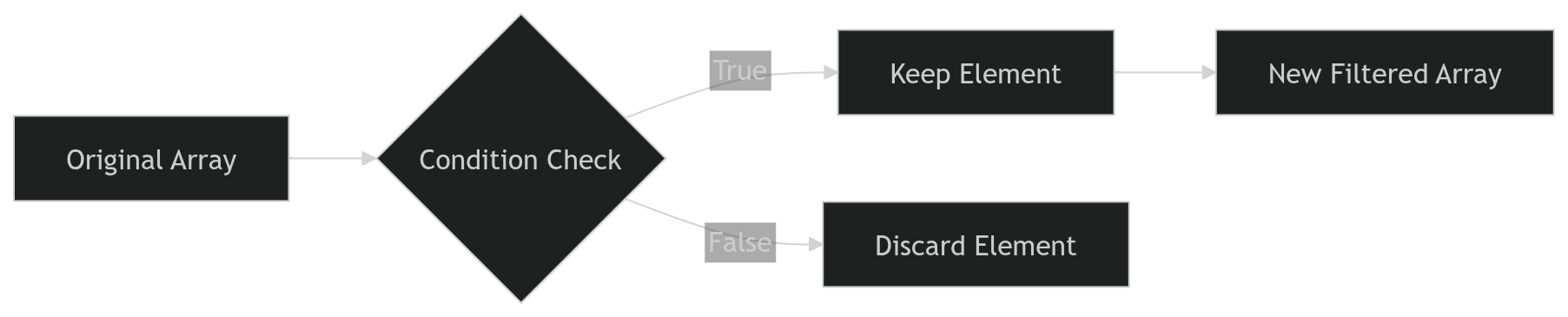
Every element is tested against a condition. Only those that pass the condition are included in the new array.
reduce()
reduce() is used when we want to combine all values into a single result.
A common example is calculating the total sum of numbers.
let numbers = [5, 10, 15];

let total = numbers.reduce(function(accumulator, currentValue) {
  return accumulator + currentValue;
}, 0);

console.log(total);
Output:
30
Here:
accumulatorstores the running totalcurrentValuerepresents the current element
How reduce() Accumulates Values

You can think of reduce() as repeatedly combining values until only one result remains.
Assignment Practice
Create an array of numbers.
let numbers = [4, 8, 12, 16, 20];
Use map() to double each number.
let doubled = numbers.map(function(num) {
  return num * 2;
});

console.log(doubled);
Use filter() to get numbers greater than 10.
let filtered = numbers.filter(function(num) {
  return num > 10;
});

console.log(filtered);
Use reduce() to calculate the total sum.
let total = numbers.reduce(function(sum, num) {
  return sum + num;
}, 0);

console.log(total);
Try running these examples in the browser console and experiment with different values to see how the output changes.