Callbacks in JavaScript: Why They Exist
JavaScript treats functions as values. That means functions can be stored in variables, passed into other functions, and even returned from functions.
This ability makes JavaScript extremely flexible and is one of the reasons callbacks exist.
Callbacks are especially important in asynchronous programming, where certain tasks take time to complete, such as fetching data from a server or reading a file.
Before understanding asynchronous callbacks, it’s important to first understand that functions in JavaScript can behave like normal values.
Functions as Values in JavaScript
In JavaScript, functions can be assigned to variables.
Example:
const greet = function() {
  console.log("Hello");
};

greet();
Output:
Hello
Since functions can be stored like values, they can also be passed into other functions.
This concept is the foundation of callbacks.
What Is a Callback Function?
A callback function is simply a function passed as an argument to another function.
Example:
function greet(name, callback) {
  console.log("Hello " + name);

  callback();
}

function sayBye() {
  console.log("Goodbye");
}

greet("Ritesh", sayBye);
Output:
Hello Ritesh
Goodbye
Here:
sayByeis passed as an argumentit gets executed later inside
greet()
That is why it is called a callback.
Understanding Callback Flow

Passing Functions as Arguments
Because functions are treated as values, we can directly pass them into other functions.
Example:
function calculate(a, b, operation) {
  return operation(a, b);
}

function add(x, y) {
  return x + y;
}

console.log(calculate(5, 3, add));
Output:
8
Here:
addis passed as an argumentcalculate()calls it internally
This approach makes code reusable and flexible.
Why Callbacks Are Used in Asynchronous Programming
Some tasks in JavaScript take time to complete.
Examples:
fetching API data
reading files
waiting for user interaction
timers like
setTimeout()
JavaScript does not want to stop the entire program while waiting for these tasks. Instead, it continues running other code and uses callbacks to handle the result later.
Example using setTimeout():
console.log("Start");

setTimeout(function() {
  console.log("This runs later");
}, 2000);

console.log("End");
Output:
Start
End
This runs later
The callback function inside setTimeout() runs after 2 seconds.
Callback in an Async Scenario

Common Callback Usage Scenarios
Callbacks are used in many places in JavaScript.
Timers
setTimeout(function() {
  console.log("Timer finished");
}, 1000);
Array Methods
let numbers = [1, 2, 3];

numbers.forEach(function(num) {
  console.log(num);
});
The function inside forEach() is also a callback.
Event Handling
button.addEventListener("click", function() {
  console.log("Button clicked");
});
When the button is clicked, the callback function executes.
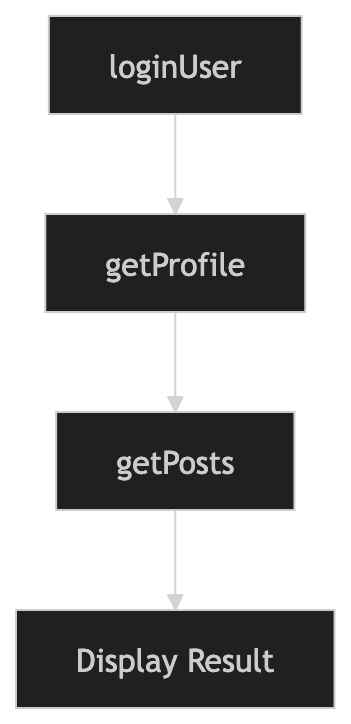
The Problem of Callback Nesting
Callbacks are useful, but too many nested callbacks can make code difficult to read.
Example:
loginUser(function(user) {

  getProfile(user, function(profile) {

    getPosts(profile, function(posts) {

      console.log(posts);

    });

  });

});
This deeply nested structure is commonly called callback hell.
As applications grow larger, this style becomes hard to manage and debug.
Modern JavaScript later introduced:
Promises
async/await
to solve these readability issues.
Visualizing Callback Nesting
Assignment Practice
Create a function that accepts another function as a callback.
function processUser(name, callback) {
  console.log("Processing user: " + name);

  callback();
}
Create a callback function.
function completed() {
  console.log("Process completed");
}
Pass the callback into the main function.
processUser("Rahul", completed);
Use a callback with setTimeout().
setTimeout(function() {
  console.log("This message appears after 2 seconds");
}, 2000);
Experiment with different callback examples in the console to better understand how functions can be passed and executed later.