Map and Set in JavaScript
As JavaScript evolved, developers needed better ways to store and manage data. Traditional arrays and objects work well in many situations, but they also have some limitations.
For example:
arrays allow duplicate values
objects only support certain types of keys cleanly
checking uniqueness manually can become messy
managing dynamic key-value data in objects sometimes feels limited
To solve these problems, JavaScript introduced two powerful data structures:
MapSet
At first they may look similar to objects and arrays, but they are designed for different use cases and provide additional flexibility.
Understanding Map and Set helps developers write cleaner and more efficient JavaScript code.
Why Traditional Objects and Arrays Sometimes Become Limited
Before learning Map and Set, it helps to understand the problems they solve.
Problem with Arrays
Arrays are excellent for ordered lists, but they allow duplicate values.
Example:
const numbers = [1, 2, 2, 3, 3, 4];

console.log(numbers);
Output:
[1, 2, 2, 3, 3, 4]
Sometimes duplicates are unwanted.
For example:
unique usernames
unique tags
unique product IDs
Managing uniqueness manually inside arrays becomes inconvenient.
Problem with Objects
Objects are commonly used for storing key-value data.
Example:
const user = {
  name: "Ritesh",
  age: 22
};
This works well, but objects have some limitations:
keys are mostly treated as strings
maintaining insertion order can become tricky
objects are not designed purely for data mapping
That is where Map becomes useful.
What Is a Map?
A Map is a special JavaScript object used for storing data in key-value pairs.
It is similar to a normal object, but more flexible and powerful.
Example:
const userMap = new Map();

userMap.set("name", "Ritesh");
userMap.set("age", 22);

console.log(userMap);
Here:
"name"is the key"Ritesh"is the value
Understanding Map Key-Value Storage
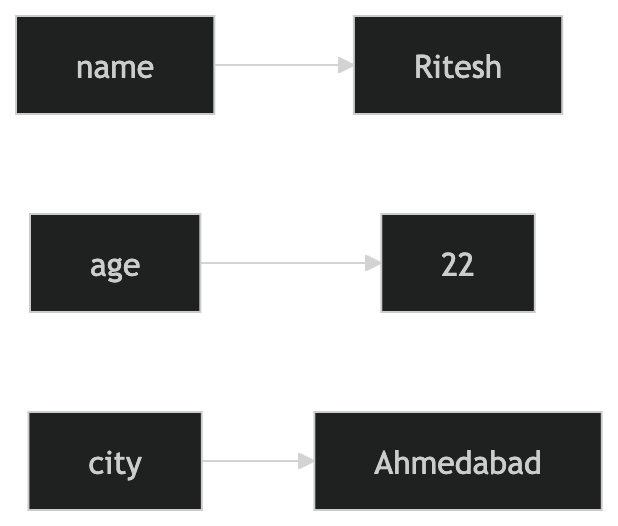
This diagram shows how a Map stores data as connected key-value pairs.
Common Map Methods
Adding Values with set()
const student = new Map();

student.set("name", "Rahul");
student.set("course", "MCA");
Accessing Values with get()
console.log(student.get("name"));
Output:
Rahul
Checking Keys with has()
console.log(student.has("course"));
Output:
true
Removing Values with delete()
student.delete("course");
Why Map Is Better Than Object in Some Cases
A Map allows:
keys of any data type
better performance for frequent additions/removals
cleaner iteration
predictable insertion order
Example:
const map = new Map();

map.set(1, "Number Key");
map.set(true, "Boolean Key");
map.set({}, "Object Key");
Objects cannot handle this as cleanly.
Difference Between Map and Object
| Feature | Object | Map |
|---|---|---|
| Key Types | Mostly strings | Any data type |
| Order | Less predictable | Maintains insertion order |
| Iteration | Less convenient | Easier iteration |
| Designed For | General objects | Key-value storage |
What Is a Set?
A Set is a special collection that stores only unique values.
Duplicate values are automatically removed.
Example:
const numbers = new Set([1, 2, 2, 3, 3, 4]);

console.log(numbers);
Output:
Set(4) {1, 2, 3, 4}
Even though duplicates were added, the Set kept only unique values.
Understanding Set Uniqueness
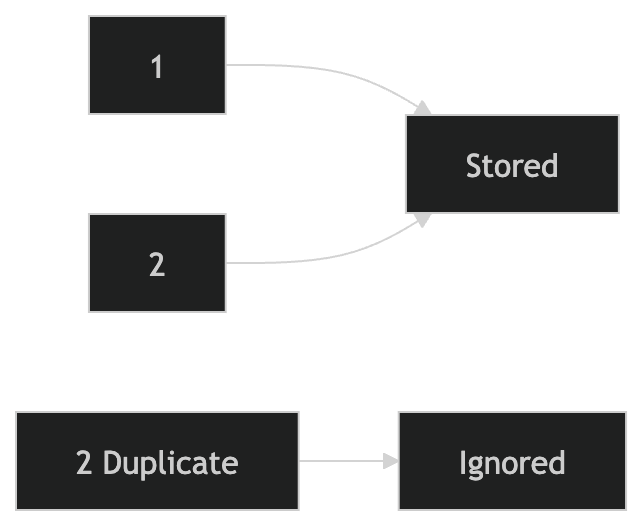
This represents how Set automatically ignores duplicate values.
Common Set Methods
Adding Values with add()
const fruits = new Set();

fruits.add("Apple");
fruits.add("Banana");
fruits.add("Apple");
Only unique values remain.
Checking Values with has()
console.log(fruits.has("Apple"));
Output:
true
Removing Values with delete()
fruits.delete("Banana");
Difference Between Set and Array
| Feature | Array | Set |
|---|---|---|
| Duplicate Values | Allowed | Not allowed |
| Order | Ordered | Ordered |
| Access by Index | Yes | No |
| Main Purpose | Store lists | Store unique values |
Real-World Use Cases of Set
Sets are useful for:
removing duplicates
unique usernames
unique categories
tracking visited pages
preventing repeated values
Example:
const emails = [
  "a@gmail.com",
  "b@gmail.com",
  "a@gmail.com"
];

const uniqueEmails = new Set(emails);

console.log(uniqueEmails);
Real-World Use Cases of Map
Maps are useful for:
caching data
storing user sessions
managing configurations
dynamic key-value relationships
Example:
const productPrices = new Map();

productPrices.set("Laptop", 55000);
productPrices.set("Phone", 30000);

console.log(productPrices.get("Laptop"));
When to Use Map and Set
Use Map when:
you need flexible key-value storage
keys may not be strings
insertion order matters
Use Set when:
uniqueness matters
duplicates should be removed automatically
Comparing Traditional Structures with Modern Structures
Traditional Object
const user = {
  name: "Ritesh"
};
Modern Map
const userMap = new Map();

userMap.set("name", "Ritesh");
Traditional Array
const numbers = [1, 2, 2, 3];
Modern Set
const uniqueNumbers = new Set([1, 2, 2, 3]);
Why These Data Structures Matter
As applications grow larger, managing data efficiently becomes important.
Map and Set provide:
cleaner data handling
better organization
improved readability
useful built-in behavior
Modern JavaScript applications use these structures frequently, especially in frontend frameworks and large-scale applications.
Assignment Practice
Create a Map and store student details.
const student = new Map();

student.set("name", "Rahul");
student.set("age", 21);

console.log(student.get("name"));
Create a Set with duplicate values.
const numbers = new Set([1, 2, 2, 3, 4, 4]);

console.log(numbers);
Check if a value exists inside a Set.
console.log(numbers.has(3));
Experiment with adding and removing values from both Map and Set to better understand how they behave differently from normal arrays and objects.
Comments
Join the discussionNo comments yet. Be the first to comment.