Spread vs Rest Operators in JavaScript
Modern JavaScript introduced many features that make code cleaner and easier to work with. Two of the most useful features are the spread operator and the rest operator.
At first glance, both operators look identical because they use three dots (...), but they behave differently depending on the situation.
The easiest way to remember them is:
Spread → expands values
Rest → collects values
Once you understand this idea, the difference becomes much clearer.
What the Spread Operator Does
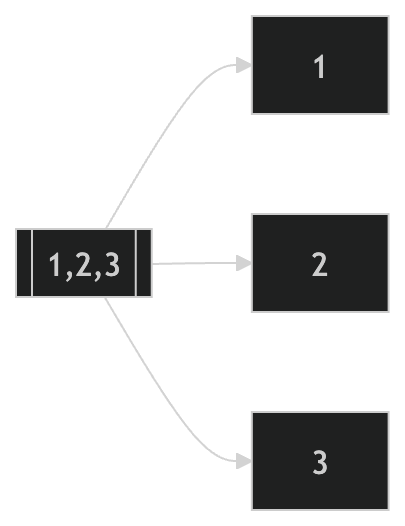
The spread operator is used to expand elements from an array or object.
Example:
let numbers = [1, 2, 3];

console.log(...numbers);
Output:
1 2 3
Instead of printing the array as a single structure, spread expands each element individually.
Visualizing Spread Expansion
Using Spread with Arrays
Spread is commonly used for copying and merging arrays.
Copying an Array
let original = [1, 2, 3];

let copy = [...original];

console.log(copy);
This creates a new array with the same elements.
Merging Arrays
let arr1 = [1, 2];
let arr2 = [3, 4];

let merged = [...arr1, ...arr2];

console.log(merged);
Output:
[1, 2, 3, 4]
This is much cleaner than manually combining arrays.
Using Spread with Objects
Spread also works with objects.
Example:
let user = {
  name: "Ritesh",
  age: 22
};

let updatedUser = {
  ...user,
  city: "Ahmedabad"
};

console.log(updatedUser);
Output:
{
  name: "Ritesh",
  age: 22,
  city: "Ahmedabad"
}
This is commonly used in modern frontend frameworks like React.
What the Rest Operator Does
The rest operator does the opposite of spread.
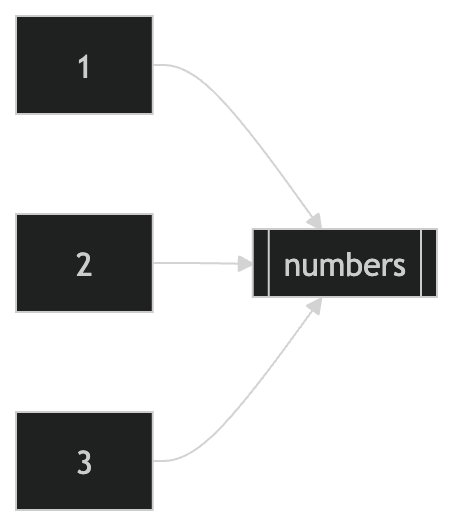
Instead of expanding values, it collects multiple values into a single array.
Example:
function add(...numbers) {
  console.log(numbers);
}

add(1, 2, 3, 4);
Output:
[1, 2, 3, 4]
All arguments are collected into the numbers array.
Visualizing Rest Collection
Rest Operator with Function Parameters
The rest operator is useful when the number of arguments is unknown.
Example:
function sum(...numbers) {
  let total = 0;

  for (let num of numbers) {
    total += num;
  }

  return total;
}

console.log(sum(1, 2, 3, 4));
Output:
10
This makes functions more flexible.
Difference Between Spread and Rest
| Feature | Spread Operator | Rest Operator |
|---|---|---|
| Purpose | Expands values | Collects values |
| Usage | Arrays, objects, function calls | Function parameters, destructuring |
| Result | Separate elements | Single array |
Although both use ..., their behavior depends on the context.
Practical Use Cases
Copying Arrays
let fruits = ["Apple", "Banana"];

let copiedFruits = [...fruits];
Merging Objects
let obj1 = { a: 1 };
let obj2 = { b: 2 };

let combined = { ...obj1, ...obj2 };
Flexible Function Arguments
function multiply(multiplier, ...numbers) {
  return numbers.map(num => num * multiplier);
}

console.log(multiply(2, 1, 2, 3));
Output:
[2, 4, 6]
Understanding Expanding vs Collecting
A simple way to remember the difference:
Spread
[1,2,3] → 1,2,3
Spread takes one structure and expands it into individual values.
Rest
1,2,3 → [1,2,3]
Rest takes multiple values and collects them into a single array.
Assignment Practice
Create two arrays and merge them using spread.
let arr1 = [1, 2];
let arr2 = [3, 4];

let merged = [...arr1, ...arr2];

console.log(merged);
Copy an object using spread.
let student = {
  name: "Rahul",
  age: 21
};

let copiedStudent = { ...student };

console.log(copiedStudent);
Create a function using the rest operator.
function collect(...items) {
  console.log(items);
}

collect("Apple", "Banana", "Mango");
Try experimenting with different arrays and objects in the console to better understand how spread expands values and rest collects them.