Synchronous vs Asynchronous JavaScript
When beginners start learning JavaScript, one thing often feels confusing:
“How does JavaScript run multiple things while still being single-threaded?”
You may notice situations where some code executes immediately while other code runs later. This behavior comes from the difference between synchronous and asynchronous execution.
Understanding this concept is extremely important because asynchronous programming is used everywhere in modern web development:
API calls
loading data
timers
authentication
file uploads
database operations
Once you understand synchronous and asynchronous behavior properly, concepts like callbacks, promises, and async/await become much easier.
Understanding How JavaScript Normally Runs Code
By default, JavaScript executes code line by line, from top to bottom.
This type of execution is called synchronous execution.
Think of it like standing in a queue at a ticket counter:
One person finishes first
Then the next person gets served
Nobody skips the line
JavaScript behaves similarly in synchronous code.
What Synchronous Code Means
Synchronous code executes one statement at a time in sequence.
The next line waits until the current line finishes execution.
Example:
console.log("Step 1");

console.log("Step 2");

console.log("Step 3");
Output:
Step 1
Step 2
Step 3
Here:
JavaScript completes Step 1 first
then Step 2
then Step 3
Nothing happens simultaneously.
Synchronous Execution Timeline

This shows how synchronous code executes one task after another in order.
Why Synchronous Execution Can Become a Problem
Synchronous execution works well for small tasks, but problems appear when one task takes a long time.
Imagine this situation:
You open a website
The website needs data from a server
Fetching that data takes 5 seconds
If JavaScript waited synchronously for the server response, the entire webpage would freeze during that time.
The user wouldn’t be able to:
click buttons
scroll
type anything
This situation is called blocking.
Understanding Blocking Code
Blocking code stops other operations from running until the current task finishes.
Example:
console.log("Start");

for (let i = 0; i < 10000000000; i++) {
  // long task
}

console.log("End");
Here:
JavaScript gets stuck in the loop
nothing else can execute until the loop finishes
This blocks the program.
What Asynchronous Code Means
Asynchronous code allows JavaScript to start a task and continue running other code without waiting for that task to finish.
Instead of blocking execution, JavaScript handles long-running tasks in the background.
Think of ordering food online:
You place the order
The restaurant prepares the food
Meanwhile, you continue doing other work
When the food arrives, you handle it
That’s basically asynchronous behavior.
Simple Asynchronous Example
console.log("Start");

setTimeout(() => {
  console.log("Task completed");
}, 2000);

console.log("End");
Output:
Start
End
Task completed
Even though setTimeout() appears in the middle, JavaScript does not wait for 2 seconds before continuing.
Instead:
the timer starts
JavaScript moves forward
later, the callback executes
This is non-blocking behavior.
Understanding Non-Blocking Execution

This represents how JavaScript continues execution while asynchronous work happens separately.
Why JavaScript Needs Asynchronous Behavior
Modern applications constantly deal with tasks that take time.
Examples include:
API requests
database queries
image uploads
payment processing
fetching user data
timers and delays
If JavaScript handled all these tasks synchronously, websites would feel extremely slow and frozen.
Asynchronous behavior keeps applications responsive and smooth.
Real-World Example: Fetching Data from an API
Imagine a weather app requesting temperature data from a server.
Fetching server data may take several seconds depending on:
internet speed
server response time
network conditions
If JavaScript blocked everything during that wait:
buttons would stop working
animations would freeze
users would think the website crashed
Instead, JavaScript performs the request asynchronously and continues running the rest of the application.
Understanding the Task Queue Concept
JavaScript uses mechanisms like:
Web APIs
Callback Queue
Event Loop
to manage asynchronous tasks.
You do not need to master all internals immediately, but understanding the general flow is helpful.
Asynchronous Task Queue Concept
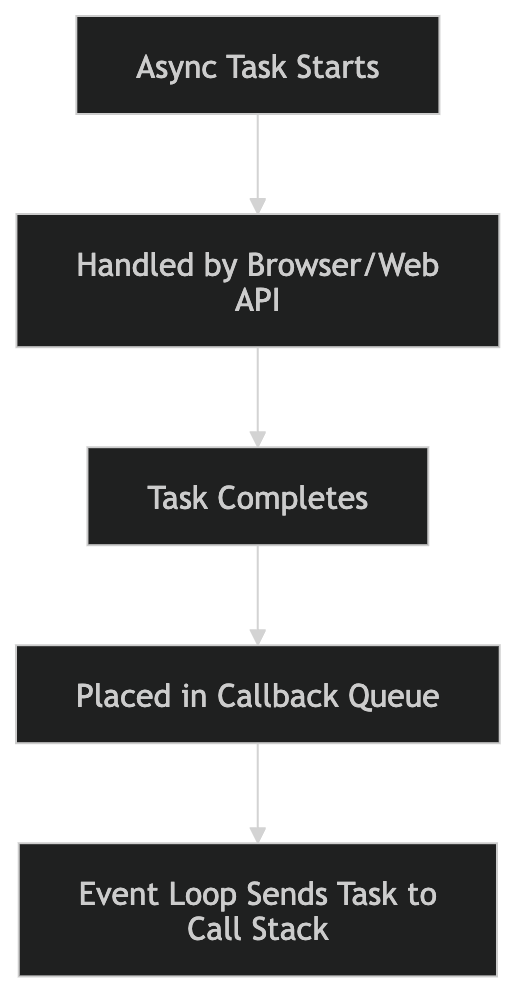
This is the basic idea behind asynchronous execution in JavaScript.
Comparing Synchronous and Asynchronous Code
Synchronous Version
console.log("Task 1");

console.log("Task 2");

console.log("Task 3");
Everything waits for the previous task.
Asynchronous Version
console.log("Task 1");

setTimeout(() => {
  console.log("Async Task");
}, 2000);

console.log("Task 2");
JavaScript continues execution instead of waiting.
Blocking vs Non-Blocking Code
| Feature | Synchronous | Asynchronous |
|---|---|---|
| Execution Style | One task at a time | Tasks can happen later |
| Waiting Behavior | Blocks execution | Non-blocking |
| Speed Perception | Can feel slow | More responsive |
| Common Usage | Simple calculations | API calls, timers, network requests |
Everyday Analogy
Synchronous
You stand in line at a bank and cannot do anything else until your work is completed.
Asynchronous
You order food online and continue watching a movie while waiting for delivery.
This is the easiest way to remember the difference.
How Async Concepts Connect Together
Many modern JavaScript concepts are built on asynchronous programming:
callbacks
promises
async/await
These are simply different ways of handling asynchronous operations.
Understanding synchronous vs asynchronous execution creates the foundation for learning all of them properly.
Assignment Practice
Create a synchronous example.
console.log("Step 1");

console.log("Step 2");

console.log("Step 3");
Create an asynchronous example using setTimeout().
console.log("Start");

setTimeout(() => {
  console.log("This runs later");
}, 2000);

console.log("End");
Observe the output carefully and compare the execution order.
Try increasing or decreasing the timeout value to better understand how asynchronous tasks behave independently from the main execution flow.